From a Photo to a Full Term of Live Classes — We Filmed It
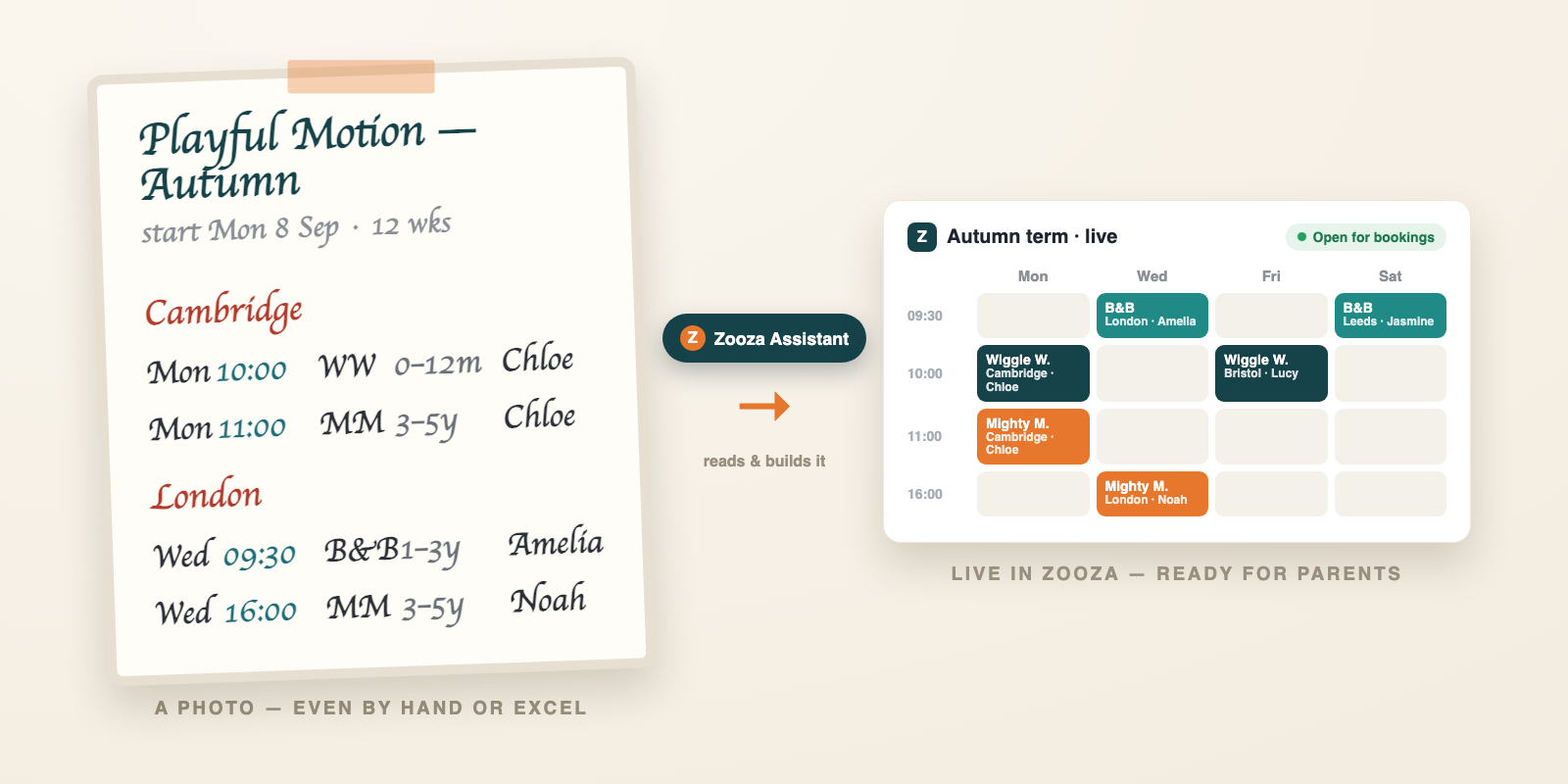
One of our customers sent us something we couldn’t stop thinking about. She’d taken a screenshot of her schedule — a plain Excel sheet, the way thousands of activity-business operators still plan a season — dropped it into an AI chat connected to her Zooza account, and a few minutes later she had 68 classes created in Zooza. Every session scheduled. A whole new term, ready to share with parents. From a photo.
We had to try it ourselves. So we set up a demo account of our own — Playful Motion, an invented business built to behave like a real one — and hit record. Nothing staged, nothing rehearsed, nothing cut: one take, the real product, the result published and bookable at the end of it.
Watch It Happen
What You Just Watched
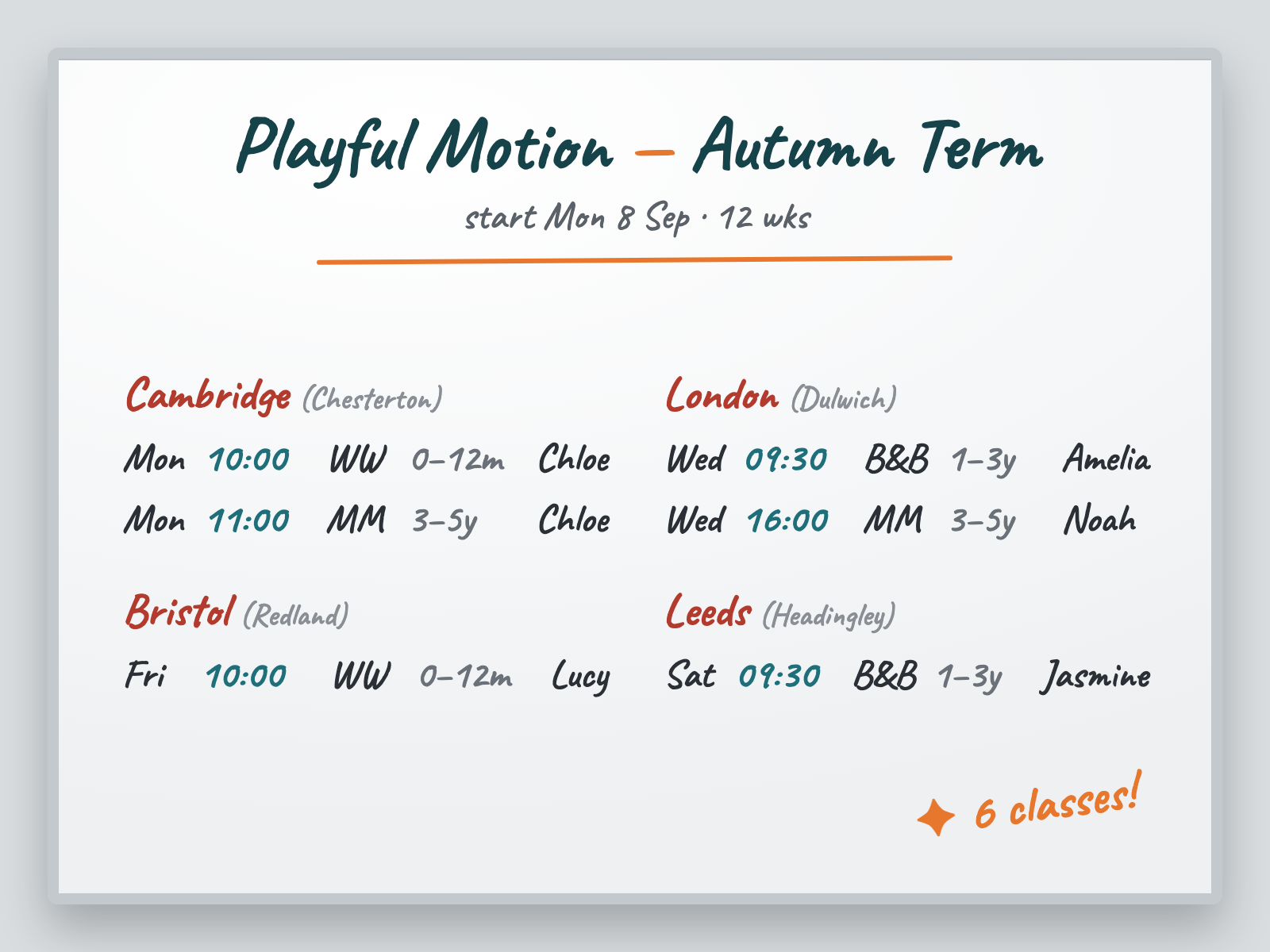
One photo of an autumn schedule. One sentence: “Here’s my autumn schedule — create these classes in my Playful Motion account, starting Monday the 8th of September, running for 12 weeks.” Then a cup of tea while Zooza Assistant did the work.
What it built, live:
- 6 classes across 4 venues — Cambridge, London, Bristol and Leeds — each placed at the right hall.
- The right instructor on each class — Chloe, Noah, Amelia, Lucy and Jasmine, matched from first names alone.
- A full 12-week autumn term — every weekly session generated, from the 7th of September onward.
- The October half-term skipped — those dates were already set in the account's holiday calendar, and it respected them without being reminded in the prompt.
- Prices inherited from each programme’s settings — no re-entering fees.
You Stay in Control
The part that matters most isn’t the speed — it’s that nothing happened behind your back. Zooza Assistant showed the full plan first: the classes, the sessions laid out as a week, the dates. It asked the real questions a careful operator would ask — should these be published for online booking? which billing period applies? — and only created anything after an explicit “yes, go ahead.”
The Bigger Shift: No More Blank Page
In the previous piece in this series, we argued that the hardest part of a new season was never the work itself — it was the blank page. The cold start. The empty schedule builder with forty slots to fill and zero pre-populated.
This video is that argument made concrete. The operator didn’t open an empty screen, didn’t learn a new interface, didn’t build anything by hand. She described what she already had — in the messy, human format she already had it in — and it existed. A start without a blank page.
Do It Yourself
You don’t need anything special — just your Zooza account connected to the AI tool you already use (Claude or ChatGPT). Then:
- Take a photo of your schedule. A whiteboard, a spreadsheet screenshot, even a sketch on paper — whatever you already have.
- Upload it and ask, in plain words. Something like:
- Review the preview and confirm. Zooza Assistant shows you everything as a table and one week as a calendar. When it looks right, you say go — and your term is live, ready for parents.
That’s the whole shift. Two days of setup becomes a photo and a sentence. Want to see what it can do with your schedule? Meet Zooza Assistant — or just start free and try it on your next term.